hadoiii...nah, kena sejibik.dulu elok2 pkai cokia,gatal nak tukar.skang apa dah jadi huhuhuhuhu~ padan muka aku.aku rasa kejadian paling tensen bagi pengguna telifon bimbit adalah apabila SEMUA no kenalan dia 'ter'padam & dia tak memiliki fail simpanan utk hal tersebut.arghhhh...jenuh beb nak taip 1-1 balik semua.mau beratus-ratus lemon...sebagai penyelesaian,aku pon pilih2 la nama2 yang patut berada dalam kancah hidup telipon sesentuh aku tu.dan aku amat berharap file backup yang aku hasilkan kali ini akan menunjukkan prestasi yang cemerlang apabila khidmatnya ditagih kelak.bukan apa,aritu aku dh buat fail simpanan guna pimbackup,tapi x layan aa..bila aku try restore,keluar paparan menyatakan usaha tersebut gagal.adei adei adei..so harap kali ini tidak akan berlaku lagi.
owh..lagi satu.kalau henset tetiba x detect line provider tu...pandai2 la buat backup apa yang patut.lps tu try cabut kad sim & taruk kat henset lain...tgk boleh jalan ke x.kalu bolih jalan,maksudnya kad sim tu ok cuma henset tu je yang x ok.so renung-renungkan lah dan selamat beramal
Saturday, January 22, 2011

Monday, January 10, 2011
L O V E breed H A T E ?? (vice versa)

adoi adoi adoi...AJL baru je abis dan pemenangnya ialah Cik Ana.apa apa pon tahniah kepada FT (Peja Tahir) kerana sempat menggondol persembahan terbaik utk lagu HANYUT (or is it TENGGELAM??)BLACK mcm biasa..suara mantap!!tp heran plk aku vokal terbaik dapat kat si kembar JOHAN raja lawak tu.
kaitan dengan tajuk aku ialah...AKU X SUKA ANA!!hahahahaha~tp dlu pon aku x suka FT,CT pon aku x minat...Mamat Khalid pon seangkatan laa.tp sekarang dah lain...FT dah jadi artis kegemaran aku hahahaha~ lagu2 CT pon aku dah boleh layan sikit2...cerita brade Mamat Khalid yang dlu aku tgk tah apa2...skang dah agak2 tau dah apa yang tersirat dan tersurat (macam karangan BM SPM daa..)
tp ada satu yang aku benci dan aku harap x akan berubah...ManUre hahahahha~
p/s: kesemua pernyataan diatas adalah berkenaan BENCI kepada SUKA,so utk SUKA kepada BENCI..nantikan kemunculannya huhuhu~
Sunday, January 9, 2011
Tips To Boost-Up Your Upload/Download Speed
If you have'nt already patched the TCPIP.sys file in Windows XP,your torrents will run slow because XP is limiting the amount of Half-open Connections.First click here and download the zip file and extract it. (Make sure you disable your antivirus first and exempt/excluding the file from being detected as a virus.)
Now run the file EvID4226Patch.exe,it will open a dos box which looks like this..

if your TCPIP.sys is not patched it will tell you the max is 10(circled).If you click Y on your keyboard(circled) it will change the max to 50.

once you have done that it will patch the file and countdown 15 seconds(incase Windows XP's file protection system changes it back)if done succesfully you will see this.

dont worry about this popup just click cancel

then on this one click YES

once completed REBOOT your pc and run the EvID4226Patch.exe once more just to check,if TCPIP limit has changed exit the dos box.
My downloads and uploads were slow as hell,you dont have too change too 50 you can try 70 or even 100,but it depends on the speed of your connection,i have mine set at 50 and have no problems,so i hope this helps those who also have slow speeds.
That work just in XP. Vista is more complicated, try here or here. or you can follow the tutorial below;
First of all you need to check if it has worked and your TCP Connections are still not maxed out.
To do this open up the event viewer by clicking “Start” > "Run" > Enter " eventvwr.msc " > Click "Ok".
Once the Event Veiwer is open, go to "Event Viewer (Local)" > "System" > Sort by "Event" and scroll down to 4226.

Check the dates of the events.
Also you need to be setting the value in your utorrent (if your using utorrent)

-Running EventID4226Fix for Windows Vista:
-Extract all contents of the file to a folder.
-If you are running 64-bit Vista double click on InstallPatch64.bat.
-If you are running 32-Bit Vista double click on InstallPatch32.bat.
-If you are not sure run InstallPatch32.bat.
-Some text should scroll by in a MS-DOS window after it ends type Y and press Enter.
-After the restart notice appears, press any key and restart your PC.
-If after changing the limit it asks for your windows CD click cancel and don't insert your
-Windows CD as it will just replace the file back to what it was.
Anyway, Vista sucks.. why dont' you try to rollback to XP or maybe Windows 7. Have a try.. now i can download 10 stuff without lag on my laptop. I think the speed more faster if on desktop.
kudos: SupErcalifragilisticeXpialidocious
Now run the file EvID4226Patch.exe,it will open a dos box which looks like this..
if your TCPIP.sys is not patched it will tell you the max is 10(circled).If you click Y on your keyboard(circled) it will change the max to 50.

once you have done that it will patch the file and countdown 15 seconds(incase Windows XP's file protection system changes it back)if done succesfully you will see this.

dont worry about this popup just click cancel

then on this one click YES

once completed REBOOT your pc and run the EvID4226Patch.exe once more just to check,if TCPIP limit has changed exit the dos box.
My downloads and uploads were slow as hell,you dont have too change too 50 you can try 70 or even 100,but it depends on the speed of your connection,i have mine set at 50 and have no problems,so i hope this helps those who also have slow speeds.
That work just in XP. Vista is more complicated, try here or here. or you can follow the tutorial below;
First of all you need to check if it has worked and your TCP Connections are still not maxed out.
To do this open up the event viewer by clicking “Start” > "Run" > Enter " eventvwr.msc " > Click "Ok".
Once the Event Veiwer is open, go to "Event Viewer (Local)" > "System" > Sort by "Event" and scroll down to 4226.
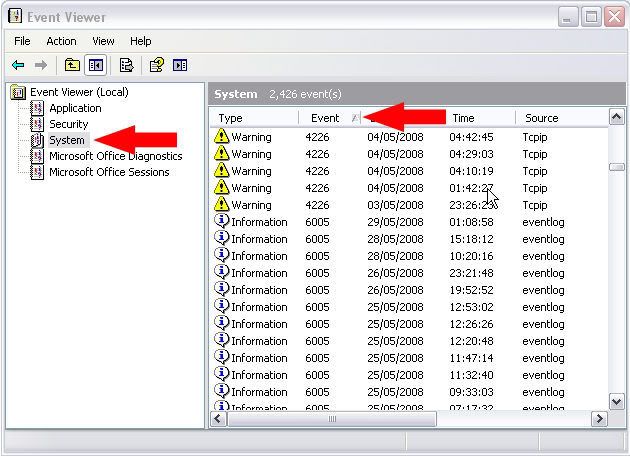
Check the dates of the events.
Also you need to be setting the value in your utorrent (if your using utorrent)
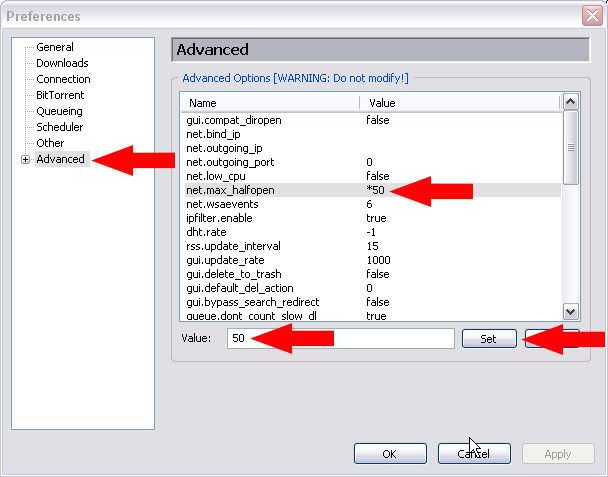
-Running EventID4226Fix for Windows Vista:
-Extract all contents of the file to a folder.
-If you are running 64-bit Vista double click on InstallPatch64.bat.
-If you are running 32-Bit Vista double click on InstallPatch32.bat.
-If you are not sure run InstallPatch32.bat.
-Some text should scroll by in a MS-DOS window after it ends type Y and press Enter.
-After the restart notice appears, press any key and restart your PC.
-If after changing the limit it asks for your windows CD click cancel and don't insert your
-Windows CD as it will just replace the file back to what it was.
Anyway, Vista sucks.. why dont' you try to rollback to XP or maybe Windows 7. Have a try.. now i can download 10 stuff without lag on my laptop. I think the speed more faster if on desktop.
kudos: SupErcalifragilisticeXpialidocious
Tuesday, December 28, 2010
Backup Windows Phone???


Normally when we talk about backups you immediately think about the PC or the laptop, but nowadays PDA’s, especially Windows driven ones, are becoming more and more important in the workplace and in our everyday lives.
It’s also inevitable, especially under any build of Windows, that you chance losing your data. Notwithstanding the inherent faults in Windows, having all your life’s info in a device that can be dropped, stepped on, kicked, flung accidentally while speaking in an animated fashion (git her done), melted, forgotten and otherwise mistreated can be very precarious.
Yes, people use ActiveSync to “sync” their data up to a computer but what if you want to do it on the fly or you simply detest Microsoft ActiveSync? What if you are a Mac or Linux user?
The need for a backup solution for Windows Mobile has arrived. Along with it is the need for our beloved readers to have access to a totally FREE solution that will allow them to breathe a little easier next time something happens to their phone. Outlook is both costly and sucks up your memory and does not help our everyday users on the go.
Enter PPCPIMBackup. This tiny little program, with its itsy-bitsy little footprint, does everything you need in a PIM backup solution. Scheduling, an intuitive and simple interface, and the level of depth to name a few; it has all the options you could think of for a PIM backup and more. After all is said and done it will give you a single small file with your data in it.
It handles appointments, call logs, contacts, messages, tasks, speed dial AND it also sports a nifty little custom field, which you can set to a filter for certain file types or you can choose a folder, or subset of files. This program really has everything one would need in a backup solution.
Best of all I can back up to my memory card while I am outside, keep a copy of my installable files with me and always be good to restore my information on the fly! This baby even does scheduling!
The backup took mere minutes, but the peace of mind involved in knowing my PIM data is safe is priceless. All the options, shown left, are pretty much self-explanatory.
PPCPIMBackup supports file compression, scheduling and best of all, it can be installed OTA (over the air, for you noobs out there) which means you don’t have to run it through ActiveSync for it to work. In fact, the program has such a small footprint it ran right out of HTC Zip’s temp memory. The process took less than 5 minutes and ran smoothly all the way through. Although I’m pretty sure if I ran the backup using compression, it would have been slower, but I have TONS of appointments and contacts and even uncompressed, the file was tiny at a mere 218k.
Though in all fairness, had I enabled attachments in the backup options, I’m sure that 218k would have been much more.
To use “PPCPIMBackup” simply extract the ‘exe’ file from the zip and launch it directly on your Windows mobile device. That’s it. It couldn’t be any easier now could it?
What do you use for Windows Mobile backups? Shout us out in the comments.
Saturday, October 16, 2010
TERKINI!!!
keputusan perlawanan suku akhir piala malaysia Kelate vs S'gor
MAJULAH SUKAN UNTUK NEGARA!
KE-1
KE-2
KE-3
to pengulas En Zainal,sila bersikap lebih profesional
MAJULAH SUKAN UNTUK NEGARA!
KE-1
KE-2
KE-3
to pengulas En Zainal,sila bersikap lebih profesional
Subscribe to:
Posts (Atom)
